Thursday, April 6, 2023

Caption/Subtitle QC vs. Authoring

Caption/Subtitle QC vs. Authoring

The presence of captions and subtitles with digital media files has become more prominent and nearly universal. We often see content creators and distributors contemplate the difference between a Caption Authoring system and a Caption/Subtitle QC system and whether they are both needed. So, we thought it is worthwhile to clarify and differentiate the role each software category provides.

Caption/Subtitle Authoring and Caption/Subtitle QC remain two separate and distinct activities. While caption authoring is used to create captions and subtitles, caption QC is an increasingly important part of any caption/subtitle workflow in order to ensure the optimum end-user experience when viewing captions. The caption QC until recently, had remained a time-consuming and resource intensive manual process. The advent of advanced and automated caption QC software, such as CapMate from Venera Technologies, is now providing a logical alternative to the tedious manual caption QC process, allowing automation of a large portion of this process.

To further clarify and differentiate between caption authoring tools and caption QC tools, we will examine some scenarios to help you appreciate the importance of specialized caption QC systems.


Caption/Subtitle Creation

A common authoring system will let you generate raw captions using ASR (Automated Speech Recognition) technology that provides the first draft of the captions. An operator is required to then add the captions missed by the ASR technology and properly align/format all the captions as needed. Authoring systems may provide basic measurements such as CPS (Characters Per Second), WPM (Words Per Minutes) and CPL (Characters Per Line) that will allow you to rectify the basic ‘timing’ issues. Since the raw captions are generated by the tool itself, they are expected to be aligned with the converted audio. However, the responsibility of aligning any new captions you add lies with you. Authoring tools probably can not provide any analysis capabilities for sync issues on the user added segments. Another common requirement is to ensure that the captions are not placed on top of burnt-in text in the video. Again, you will have to manually ensure that no such overlapping sections exist in the video and an operator will have to watch the entire video content in order to ensure this. The full review of the caption/video is similarly required for many other common issues.

So, while an authoring system allows you to create, edit and format your captions efficiently, it usually doesn’t provide rich analysis capabilities to QC the captions. The responsibility of detecting basic issues and correcting them lies with you.


Caption/Subtitle Compliance

Let’s take this a step further. In today’s world, ensuring the basic sanity of captions is not enough. Every major broadcaster or OTT service provider or educational content provider has its own technical specifications for the captions it requires. There can be many such requirements, a few of which are as follows:
– Max number of lines of caption per screen.
– Minimum and Maximum duration of each caption.
– Captions sync aligned with audio to a maximum specified sub-second threshold.
– All captions to be placed at the bottom third of the screen, while avoiding burnt-in text overlay. In case of overlap, another position may be used.
– Detection of profanity (words defined by the user to be unacceptable)
– Spelling checks.

Caption/Subtitle Editing

So far, we have discussed only the Caption creation scenario. However, a lot of times, an existing caption file needs to be repurposed because of editing in the audio-visual content. Such changes can include the addition of certain video segments, removal of segments, changing caption location based on customer guidelines, or frame rate changes. We have encountered many cases where the customers have been trying to use the original captions with such edited content, which leads to a lot of issues. Detecting and correcting such issues manually can be time-consuming and resource intensive. Since authoring tools do not usually provide auto-analysis capabilities, they can’t help with the detection of such issues. The only way you can use caption authoring systems in this case is to use their user interface and detect/correct such issues manually.

Any compromise in this manual process will lead to missed issues in the content delivered to the customers/content owner. This will effectively mean multiple iterations, causing further delays and affecting customer satisfaction before the captions are accepted by the customer.

This is where the caption QC tools come in. Caption QC systems address these issues head-on by performing auto-detection (and in case of advanced systems like CapMate, auto-correction) for a wide-range of caption issues. With configurable QC templates, you can set up the checks you needed, define the acceptable thresholds, and let the system do its job. Since the aim of such systems is the analysis, the entire interface is designed to make the analysis and spotting quick & efficient. You only need to act upon the issues reported by the caption QC system. An intelligent caption QC system such as CapMate also provides features to automatically correct many of the issues found, as well as a rich review/editing tool, using which you can easily browse through the reported issues and make the appropriate manual corrections efficiently. They no longer need to watch the entire content.
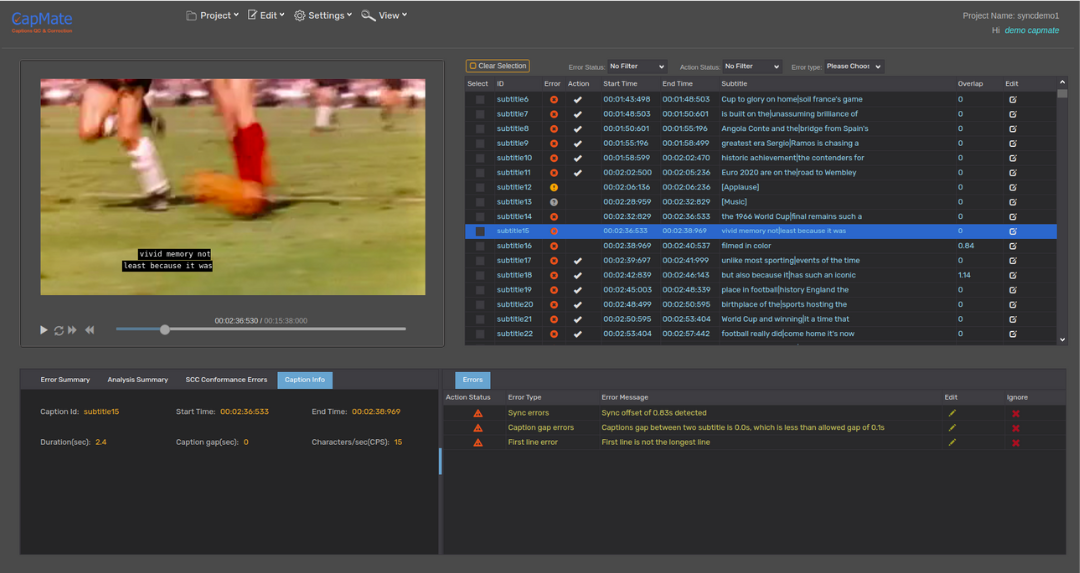
 

Not using captions QC tools means that the responsibility of detecting and correcting all captions issues lies with you, which is time-consuming and resource intensive, not to mention error-prone.

While it is understood that the concept of ‘Automated Captions QC & Correction’ is relatively new but adopting such a system can lead to significant business benefits. Our customers who have adopted the use of CapMate into their workflow are benefiting from the efficiencies gained in their caption QC operations from the insights provided by the tool along with its auto-correction abilities.

In conclusion, Caption QC and Caption Authoring tools serve different and complimentary purposes in the caption workflow operation and do their respective jobs in an excellent manner. While Caption QC tools are not intended for caption authoring, Caption Authoring tools are also not well-suited, nor are they intended, for efficient caption QC process. Using both tools judiciously in a workflow can lead to higher quality caption deliveries with more efficient use of the experienced QC operators.

About CapMate™

CapMate™ is a Cloud Native SaaS service for Captions/Subtitles QC and Correction. Whether you are a Captioning service provider, OTT service provider, Broadcaster or a Captioning platform, CapMate can significantly improve your workflow efficiency with its automatic analysis, rich review, spotting, and correction capabilities. Once completed, you can export the finished captions for direct use in production.

Get in touch with us today and we would love to discuss with you how we can help you solve your content QC challenges efficiently!


This content originally appeared here on: https://www.veneratech.com/caption-subtitle-qc-vs-authoring/

CapMate 101 – Caption/Subtitle Files Verification and Correction Solution

CapMate 101 – Caption/Subtitle Files Verification and Correction Solution

Many of our customers had been telling us that the process of validating and correcting closed caption files is tedious, time consuming and costly! And that they needed an innovative QC solution for caption and subtitle files, similar to what we have done for Audio/Video QC. We took that request to heart and have introduced CapMate, the first comprehensive cloud native caption QC software that provides verification and correction of captions and subtitle files.

In fact, CapMate is so innovative and bleeding edge that many are not even aware of such a solution category! Of course, there are a large selection of capable programs in the ‘captioning’ category that allow for creation of caption and subtitle files. However, until CapMate came around, there was NO solution to address the dire need for an innovative automated software for caption QC that could find caption related issues, much less fix them! Before CapMate, caption verification and correction was a painfully slow, manual, and error prone process.

And so starting with this blog post and following up with a series of short blogs, I would like to introduce you to this new category of software and tell you more about CapMate!

Let me start by giving you the highlights! CapMate:

  • Is a cloud-native solution that can work with your local content or those in the AWS cloud
  • Has been in heavy production use for over a year and so it already is a robust and proven solution
  • Helps drastically reduce the amount of time needed to verify and fix caption files, improving operational efficiency
  • Supports all the major caption formats such as SCC, SRT, IMSC, EBU-STL, and many more
  • Has usage-based pricing (monthly/annual/ad-hoc) so you only pay for what you use
  • Can detect the most common and difficult caption issues, like Sync, Text Overlap, missing caption, and many more
  • Can also correct these issues, in most cases automatically, and allow you to generate a new clean caption file

And so much more….

You can see a short 1-min clip highlighting CapMate’s features here.

Be on a look out for CapMate 102, the next blog in this series where I will write about one of the key features of CapMate, its ability to accurately detect and correct caption sync issues! At any time that you think CapMate may be the subtitle QC software solution you have been looking for, contact us (sales@veneratech.com), and we are happy to give you a live demo of CapMate and set you up with a FREE trial account!


This content originally appeared here on: https://www.veneratech.com/capmate-101-solution-for-verification-and-correction-of-caption-subtitle-files/

Understanding GOP – What is “Group Of Pictures” and Why is it Important

Understanding GOP – What is “Group Of Pictures” and Why is it Important

GOP or “Group of Pictures” is a term that refers to the video structure representing how digital video is grouped. But before we get into understanding GOP, let’s start with the basics of the video structure. When a video is encoded to be viewed on television or by any streaming platform, it’s important that it is compressed. In order to more easily transmit digital media, video compression is used to turn large raw video files into smaller video files that can transmit more easily over limited bandwidth. Video compression works by locating and reducing redundancies within an image or a sequence of images. A video is composed of a sequence of frames displayed at a given frequency. In most common video content, each frame is very similar to those that precede and follow it. Though there might be lots of movement in the subject of the content, the background and a large portion of the image is usually the same or very similar from frame to frame.


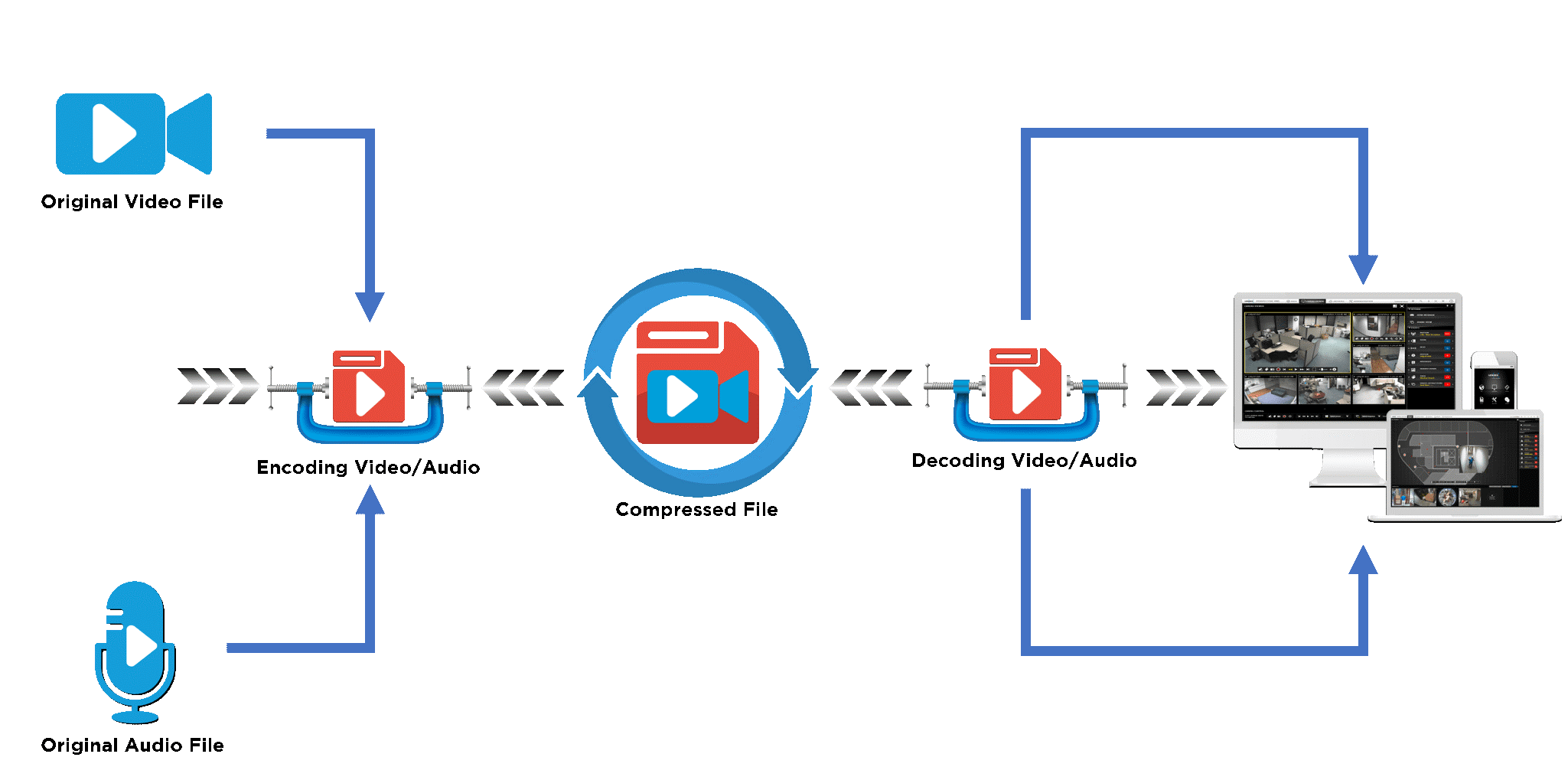
data-compression-technology

Figure 1: Encoding video for data transmission uses data compression technology
(https://lensec.com/about/news/newsletter/lpn-03-20/video-compression-flowchart/)


Video compression takes advantage of this by only sending some frames in full (known as Inter-frames or I-frames) along with the difference between the I-frame and the subsequent frames. The decoder then uses the I-frame plus these differences to accurately re-create the original frames. This method of compression is known as temporal compression because it exploits the fact that information changes in a video slowly over time. A second type of compression, known as spatial compression, is used to compress the I-frames themselves by finding and eliminating redundancies within the same image.

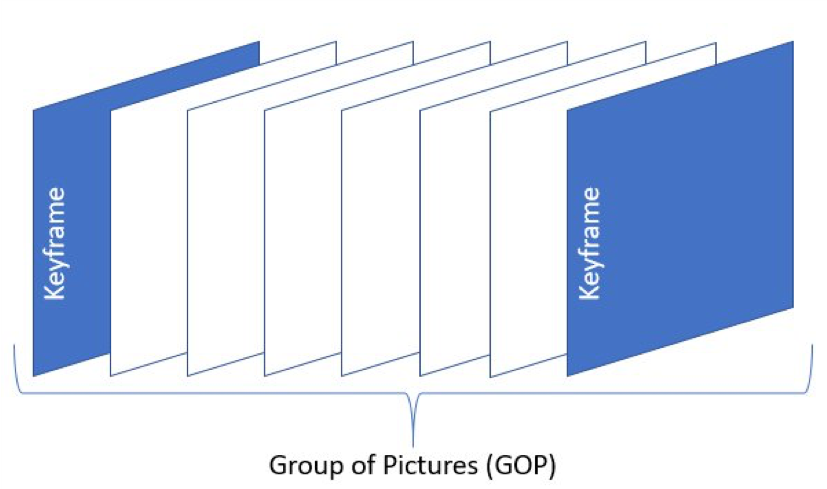
This brings us back to the concept of Group of Pictures. Put simply, a GOP is the distance between two I-frames measured in the number of frames. I-frames are sometimes referred to as “Keyframes” as they are the key that the other types of frames are structured around. Figure 2 below shows a simple representation of a single GOP. As you can see, it begins with the keyframe (blue) and the white frames contain the information used to create the appearance of motion when referencing the keyframe.


Figure 2: GOP with Keyframes
(https://aws.amazon.com/blogs/media/part-1-back-to-basics-gops-explained/)


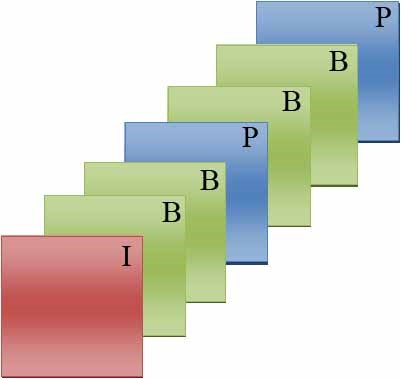
Let’s look at one example: If you’re watching a compressed video at 30 frames per second, you’re not really seeing 30 full pictures. Instead, you’re seeing sets of GOPs similar to the one pictured above. Depending on the codec, a GOP could consist of very large or very small GOP lengths. Within a typical GOP, you have three types of frames: I-frames, P-frames, and B-frames. Every GOP begins with an I-frame, which contain the complete image. After this comes the P-frames (Predicted frames) and B-frames (Bi-directionally predicted frames). P-frames reference past frames and B-frames reference past and future frames. P-frames and B-frames are incomplete images that reference the I-frame and surrounding images to fill in the blanks. P-frames and B-frames contain either bits of new visual information to replace parts of the previous frame or instructions on how to move around bits of the previous frame to create the appearance of motion. By processing and compressing GOPs instead of individual frames, file sizes and stream bitrates can be significantly reduced. Figure 3 below is a representation of these different types of frames, arranged into one Group of Pictures.


Figure 3: GOP with B-Frames and P-Frames
(https://fr.wikipedia.org/wiki/Fichier:Group_of_pictures_illustration.jpg)

Optimizing your GOP Length

The length of your GOP has important implications in regards to video quality. A shorter duration can preserve more visual information, especially in high-motion video, but is less efficient in that it needs a higher bitrate to look good. A longer GOP is useful in low-motion videos where very little in the frame changes, allowing for reduced redundancy which can look better at lower bitrates. Longer GOPs are better suited for maximum compression on a given bandwidth while smaller GOPs are better suited for scene changes, rewinding, and resiliency to media defects.


Open and Closed

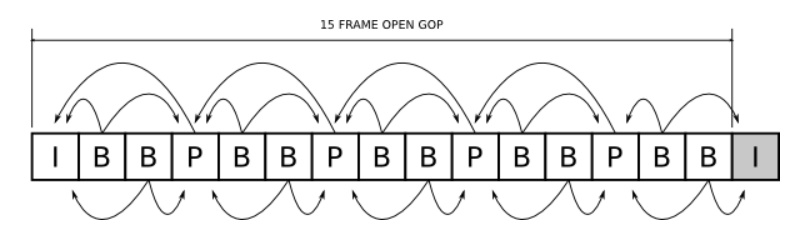
GOPs can be divided into two categories: ‘Open’ and ‘Closed’. Open GOPs are those where frames in one GOP can refer to frames in other GOPs for redundant blocks. You see this in Figure 4 below where the last two B-frames refer to the I-frame in the next GOP for redundancy.


Figure 4: Open GOP has frames that refer to frames outside the GOP for redundancies
(http://tiliam.com/Blog/2015/07/06/effective-use-long-gop-video-codecs/)


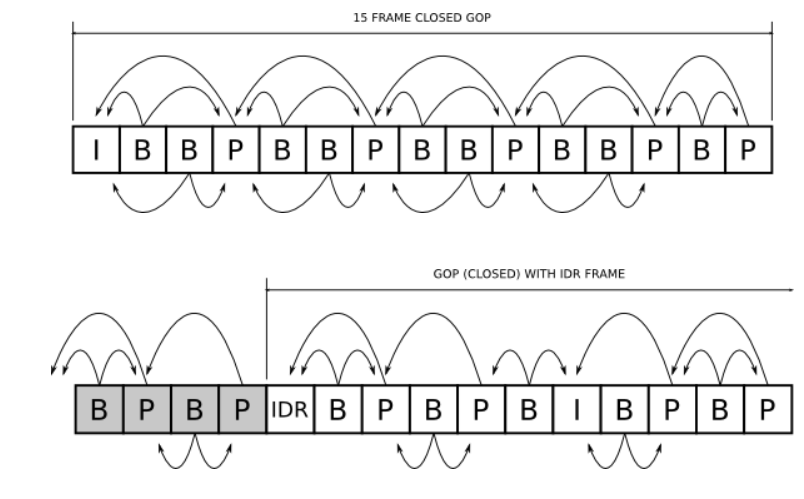
On the other hand, closed GOPs are those in which frames in one GOP can only refer to frames within the same GOP for redundant blocks. An IDR frame is a special type of I-frame that specifies that no frame after the IDR frame can reference any frame before it. Through the use of these IDR frames, we form closed GOPs which can’t refer to frames outside the GOP. The IDR frame acts as a buffer between GOPs, closing them off to references from other GOPs. This can be seen in Figure 5 below where a closed GOP is shown with an IDR frame.


Figure 5: A closed GOP can’t refer to frames outside the GOP for redundancies
(http://tiliam.com/Blog/2015/07/06/effective-use-long-gop-video-codecs/)


All in all, GOP structure is an extremely useful concept in the world of digital media that allows us to properly compress video streams and significantly reduce stream bitrates while maintaining maximum quality for a variety of applications. Encoding using I-frames, P-frames, and B-frames is an integral part of video compression in the modern digital media world and understanding the correct GOP structure for your content is vital for proper quality control and providing the best viewing experience to the viewer.


GOP Verification Tools

One integral step in the typical media workflow processing is use of QC software, such as Venera Technologies Pulsar (for on-premise QC) and Quasar (for cloud-based QC). Pulsar & Quasar offer variety of GOP level checks and are the most effective way to prevent GOP related problems in many types of content. For example, in low-motion video a larger number of B-frames can look fine, and deliver great compression ratios, but in faster motion video it will consume more processing power to decode. Using Pulsar/Quasar, the user can verify that the media has the proper GOP structure, and therefore would represent the best visual quality to the viewer.

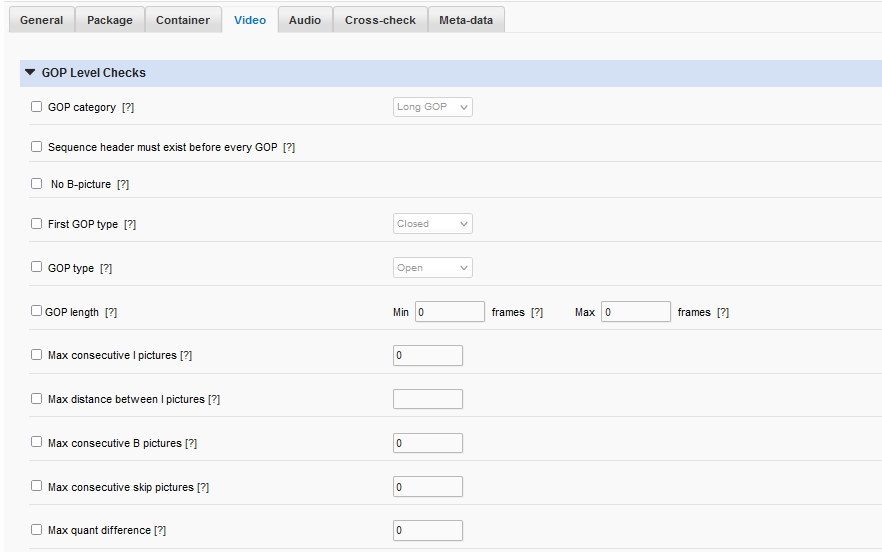
There are many options for GOP verification within Pulsar/Quasar. Since proper validation of GOP structure is an important aspect of quality control in digital media, Pulsar/Quasar make it easy to verify GOP length, verify the presence or absence of different types of frames, and check for a multitude of GOP compliance aspects. These checks can be automated and the process is as easy as customizing a template for the GOP qualities you wish to maintain and scanning files in any folder to ensure compliance.


One important check within Pulsar/Quasar is the ability to specify a range (in frames) of GOP lengths in order to verify the content falls within that range. This distinction has large implications on the file size and bandwidth required for your digital media. Another is the GOP Category verification. This allows you to specify long GOPs or I-frame only GOPs. Pulsar/Quasar also offer checks for the presence or absence of B-frames, Max consecutive I-frames, distance between I-frames, and max consecutive B-frames. Furthermore, both software solutions also allow you to verify Closed or Open GOPs.

Pulsar/Quasar support a wide range of media formats and offer comprehensive quality checks, including extensive GOP related compliance checks. They are solutions that can dramatically increase your QC efficiency when used effectively. They can be integrated into your workflow in a multitude of locations and template customization allows you to tailor them to your specific needs.

For additional information about Pulsar, please visit https://www.veneratech.com/pulsar

For additional information about Quasar, please visit https://www.veneratech.com/Quasar


This content originally appeared here on: https://www.veneratech.com/understanding-gop-what-is-group-of-pictures-and-why-is-it-important/

Dialog-gated Audio loudness and why it is important

Dialog-gated Audio loudness and why it is important

Being a fan of watching video content on a variety of devices, I sometimes get into situations where I can’t make out what is being spoken even though the overall audio levels are fine. Have you experienced these issues? I am sure they are annoying enough and make us think how this content was approved for publishing with such obvious issues.

Many of you would be surprised that such content can pass the Loudness criteria that are commonly used for typical audio QC testing, and if not manually reviewed, the content can indeed pass and be made available to consumers. This is because a more sophisticated level of Loudness testing, called ‘dialog-gated loudness’ criteria must be used in order to verify that the portion of the content with dialog has the proper loudness levels.  Not performing the dialog-gated loudness verification could result in content that while passing general Loudness criteria, may still not have audible dialogs for the viewer. This can negatively impact content providers who are continuously vying to gain & retain consumers by maintaining the high quality of their content – both technically and editorially. Now a days OTT service providers like Netflix and others require the dialog-gated loudness compliance.

In this article, we will discuss how such issues can be detected by using Dialog-gating and how our QC products can help content providers achieve this in a fully automated manner.


Dialog Gating

Gating is the process that only pass audio signal satisfying the criteria while removing the unwanted audio signals from loudness measurement. The gating criteria may be absolute audio level, relative audio level or audio type such as speech or non-speech.

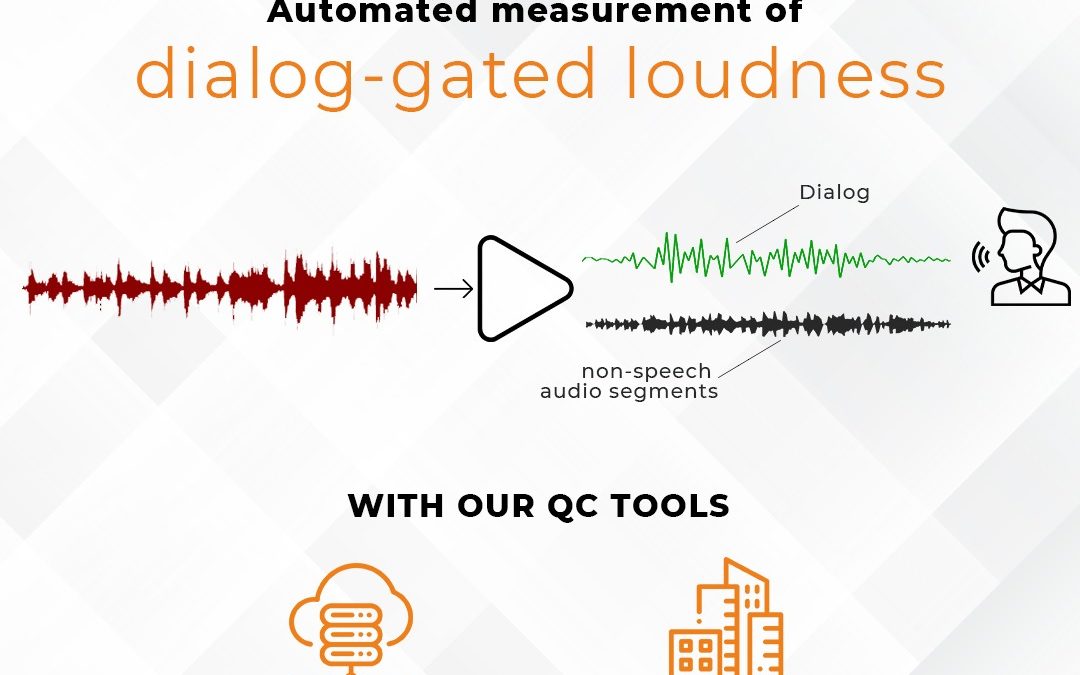
Dialog-gating is a process that only allows the audio signal which has speech content. All other non-speech audio segments are rejected and not passed through for the loudness measurement.

Level-gating is a process that only allows the audio signal higher than particular audio level to pass through. There are two common level gating techniques:

  • Absolute Gate. All the audio segments below a particular audio level (mostly -70 LKFS/LUFS) are rejected.
  • Relative Gate. All the audio segments that are lower than particular value (mostly 10 LU) below the average absolute loudness are rejected.

Let’s consider the case of a 5.1 audio stream. The list of channels in such audio stream are L, R, C, Ls, Rs, Lfe. Normally the speech content is carried in the Center (C) channel but sometimes it may be carried in Left (L) and Right (R) channels also. For this reason, only L, R and C are considered for calculating the Dialog-gated loudness and all other channels are ignored.

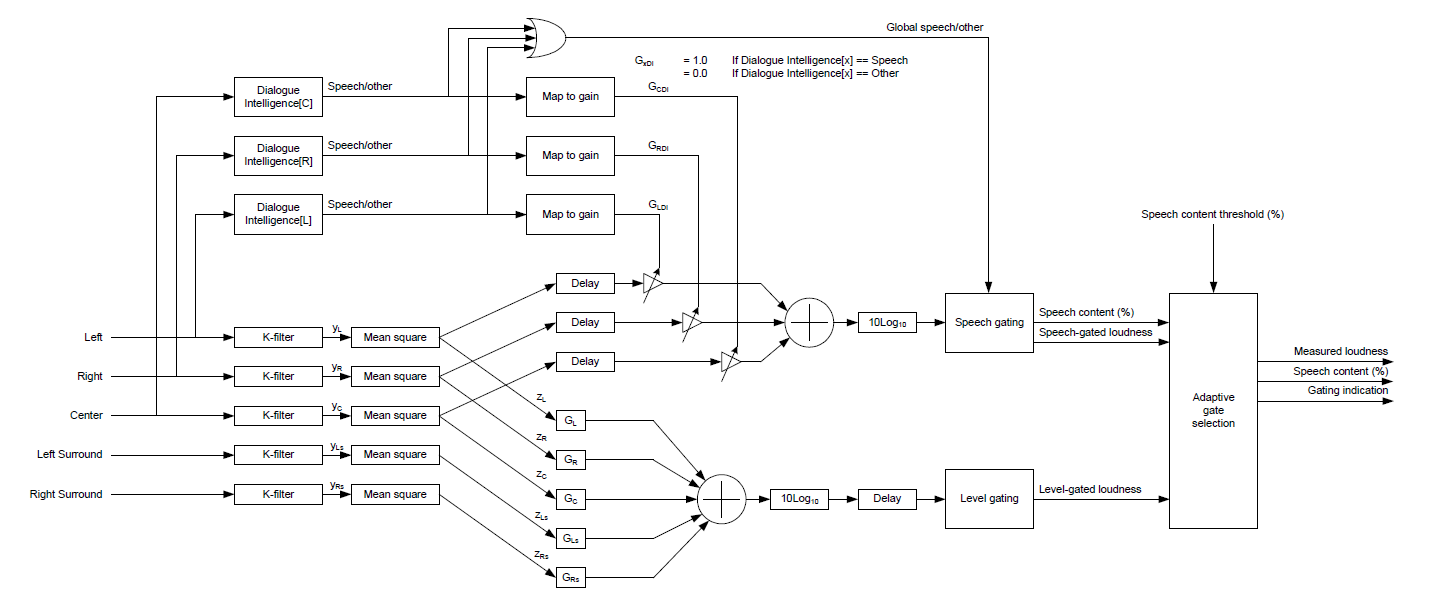
In real workflows requiring dialog-gated loudness measurement, an adaptive gating approach is taken. It means that Dialog-gated measurement should be performed if there is sufficient speech content in audio. If the speech content is not sufficient, then level gating is used to perform the loudness measurement.

The diagram below shows such a workflow for a 5.1 audio stream:


The upper half of this diagram takes the audio content from L, R and C channels for dialog-gated loudness measurement. The content is passed through “Dialogue Intelligence” to determine if the audio contains speech. If the audio has speech, it is assigned a gain of one, else zero. The resultant channels with gain are fed to the dialog gating process. In this case, only the audio segments containing speech will pass through along with corresponding loudness level and amount of speech content. Non-speech audio segments will be dropped. Adaptive gate selection decides whether to use dialog gated loudness or level gated loudness depending on the overall amount of speech content.

This measurement provides a true picture of actual speech levels in audio and content providers can be sure that the audio experience of their audience is preserved.

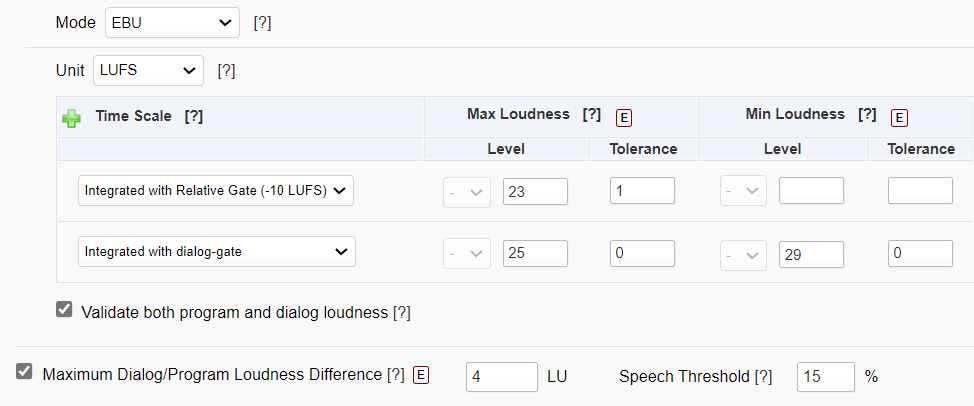
Venera’s Automated QC tools – Pulsar™ & Quasar® allows automated measurement of dialog-gated loudness measurement. Following options – shown for the EBU mode (popular standard in Europe) – are available in both the solutions:


These options are available for ATSC (popular standard in North America), OP-59 (popular standard in Australia), and ARIB TR-B32 (popular standard in Japan) modes as well.

In addition to measuring the dialog-gated loudness, users can also measure the difference of loudness level using dialog-gated measurement and level-gated measurement. This gives them a practical perspective of audio composition in the content they provide to their consumers.

Pulsar™ also allows users to automatically normalize the audio levels eliminating manual intervention in making the content compliant.

In addition to Loudness measurement, Venera’s QC tools – Quasar® & Pulsar™, offer a wide range of Audio and Video measurements that help users automate the otherwise tedious content QC operations.

Quasar® is a Native Cloud Content QC service, allowing auto scaling with ability to process hundreds of files simultaneously with wide range of content security capabilities so that our users can process their content with peace of mind. Quasar® can be integrated using REST API for highly automated workflows. Visit www.veneratech.com/quasar to read more about Quasar® and request a free trial.

Pulsar™ is an on-premise Automated File QC systems, allowing scaling with clustering of multiple Verification Units in user’s datacenter or office location. Pulsar™ is the fastest QC system in the market allowing up to 6x faster than real-time speed for HD content. Pulsar™ can be integrated using XML/SOAP API for highly automated workflows. Visit www.veneratech.com/pulsar to read more about Pulsar™ and request a free trial.

Get in touch with us today and we would be happy to discuss with you how we can help solve your content QC challenges efficiently!


This content originally appeared here on: https://www.veneratech.com/dialog-gated-audio-loudness-and-why-it-is-important/

Automated detection of Mosquito Tone in media content

Automated detection of Mosquito Tone in media content

Mosquito Tone! Does this give the impression that it has something to do with mosquitos?

Well, it does relate to tones with the buzzing sounds similar to the noise made by a mosquito but it is not directly related to ultra-sonic mosquito repellant devices in any way.

Humans can hear the sounds between frequencies of 20 Hz to 20 KHz.

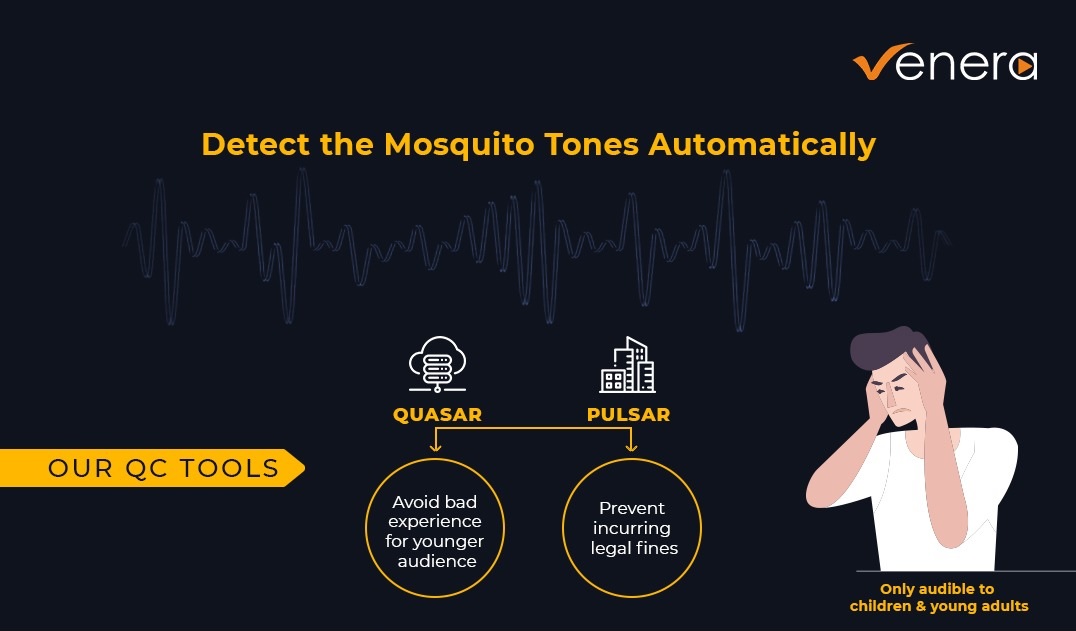
Mosquito tones are high-frequency tones, normally above 17 KHz.

These tones are inaudible by adults but can be heard by teenagers. Yes, you read it correctly! Teenagers can hear mosquito tones but adults cannot. That is because it is normal for people to lose their hearing as they age and as a result, they are unable to hear the higher frequency sounds. With age, the audible audio frequency range continue to narrow down with losses towards the high frequency. The actual audible range can vary across individuals who are similar in age.

While there are both desired and undesired uses of mosquito tone in various applications, presence of mosquito tone is generally not acceptable in the media content delivered by various content delivery services. Presence of mosquito tones can cause severe degradation in user experience for the younger population. Infants & toddlers hearing systems can be severely impacted by the presence of such tones as the adults will not even notice their presence while unknowingly exposing kids to them for an extended period of time.

It is therefore important for content providers to ensure mosquito tones are not present in the delivered content. This is where the challenge comes in.

Most of the QC operators working with content providers are adults and as a result will inevitably miss the mosquito tone even if it is present in the content. So, performing a full manual QC of the audio is certainly not sufficient to detect this. Missing such signals can prove to be very expensive for content providers in terms of increased churn as well as related legal liability, as this could be potentially harmful to the public health. In case of delivery mediums like television, the negative effect could be very wide-spread due to the inherent broadcast nature of the delivery medium.

Therefore, since it is clear that manual QC for detection of these tones will not work, using a QC tool that can performance a reliable detection of mosquito tones is necessary.

Venera’s QC tools – Quasar & Pulsar, perform audio spectrum analysis and can reliably report the presence of mosquito tones in the content. Users have the flexibility to define the frequency range for these tones, and all the mosquito tones in that range will be reliably reported for user’s review. Moreover, all such tones can be detected in an automated manner, thereby improving the workflow efficiencies significantly while saving content providers from any claims downstream.


Visit www.veneratech.com/pulsar to read more about Pulsar™ and request a free trial.

Visit www.veneratech.com/quasar to read more about Quasar® and request a free trial.


This content originally appeared here on: https://www.veneratech.com/automated-detection-mosquito-tone-in-media-content/

Automated Detection of Slates in Media Content

Automated Detection of Slates in Media Content

What is a Slate?

A Slate is a graphic element that is usually present before the essence as part of the mezzanine media file exchanged between organizations. Slate contains important information about the media in the file and usually has the following information:

  • Program/Episode-title
  • Material identification number
  • Episode number
  • Season number
  • Client/Production company brand
  • Content version
  • Aspect ratio
  • Resolution
  • Frame rate
  • Asset type: Texted master, Texted master with Textless tail, or Textless master
  • Textless material timecode in case of Textless tail
  • Audio channel layout
  • Audio Language
  • Duration
  • Clock

The actual Slate metadata can vary based on the content type (such as Advertisement, Movie, TV series) and the brand. Since the primary purpose of Slate is to describe the content, the content properties should exactly match with the Slate metadata. This is especially relevant for the audio-video technical properties outlined above. Operators need to ensure this for every media file processed.

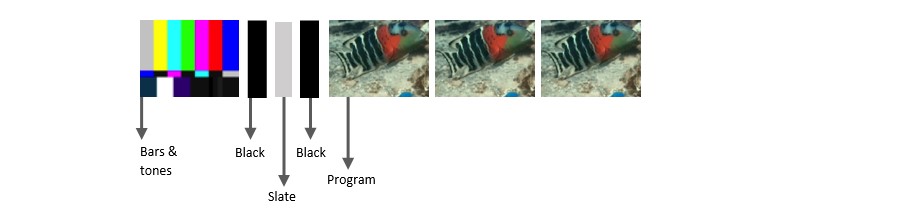
The Slate is displayed for a pre-defined duration and is usually followed by a Black segment before the actual essence starts. Other elements such as Color bar/tone, Black frames etc. may be present before the Slates. An example of a content structure is shown below. The content structures varies across different organizations.

Content Structures

Presence of Slate

Many major media companies worldwide now require Slates to be present at specific locations with specific types of meta-data. Following scenarios can lead to content rejection by customers:

  1. Slate not present at the desired location
  2. Missing information in Slate
  3. Incorrect information in Slate

Therefore, the first requirement for QC operators is to validate that the Slate is indeed present at a precise location and it contains the desired metadata. To achieve this, the operator will have to manually seek the desired timecode and validate the presence of necessary slates. This can introduce inefficiencies in high content volume requirements.

Venera’s QC solutions – Pulsar & Quasar, allow the automated detection and validation of Slate presence as per user’s specifications. Users can specify the precise time-in and time-out location of Slate, and an alert will be raised if the Slate is not present there. By doing this, there is no need for operators to manually examine every file and they only need to review the files that are flagged by Venera’s Automated QC systems. This can lead to substantial improvements in workflow efficiency, allowing better usage of manual resources.

Visit www.veneratech.com/pulsar to read more about Pulsar™ and request a free trial.

Visit www.veneratech.com/quasar to read more about Quasar® and request a free trial.


This content originally appeared here on: https://www.veneratech.com/automated-detection-of-slates-in-media-content/

What is Captions Quality and how to ensure it?

What is Captions Quality and how to ensure it?

Closed Captions are a must-have for deaf and hard to hear people comprehend and enjoy the audio-visual content.

According to DCMP (Described and Captioned Media Program), there are more than 30 million Americans with some type of hearing loss. If extended to the worldwide population, this number will easily grow to a few hundred million. This is a large population that needs effective and high-quality Closed Captions to comprehend the media content.

And it is often stated that Captions should be of “high quality” to be effective for this population.


But how does one define this “high quality” for Captions?

According to DCMP, the following are key elements of Captioning Quality:

  1. Errorless captions for each production.
  2. Uniformity in style and presentation of all captioning features.
  3. A complete textual representation of the audio, including speaker identification and non-speech information.
  4. Captions are displayed with enough time to be read completely, are in synchronization with the audio, and are not obscured by (nor do they obscure) the visual content.
  5. Equal access requires that the meaning and intention of the material are completely preserved.

Every caption service provider needs to ensure that they create “quality captions” meeting the above guidelines. And every content provider, whether a Broadcaster or a Streaming service provider, needs to ensure that they deliver high quality captions to their viewers. Failing these captioning quality standards can have a detrimental effect on their brand and people will be less enthused in signing up or continuing with their captioning/subtitling service.

Checking for all these parameters and correcting them can be resource-intensive, tedious, and cost-prohibitive. Nowadays, the same content is delivered through a variety of mediums, which may use different audio-visual content versions due to specific editing, frame rate, and other technical requirements. It is essential that the captions are also properly edited for these different content versions. Due to the sheer content volume and the cost involved in Caption/Subtitle QC & correction of each content version, captioning service providers may choose to not perform full QC on all the caption files, leading to low quality and erroneous captions. It is therefore important to bring automation in the QC process so that QC process itself becomes feasible and more manageable for everyone in the content production and delivery chain.

CapMate™, a native cloud captions verification & correction platform from Venera Technologies, allows users to automatically detect a variety of issues that affect quality. Some of these issues and their impact on quality include:

  1. Captions-Audio sync: Readability issue
  2. Detection of missing captions: Clarity issue
  3. Captions overlaid on burnt-in text: Readability issue
  4. Captions duration: Readability issue
  5. Characters per line: Readability issue
  6. Characters per second: Readability issue
  7. Words per minute: Readability issue
  8. The gap between captions: Readability issue
  9. Number of caption lines: Readability issue
  10. Spell Check: Accuracy
  11. Detection of Profane/foul words: Compliance issue
  12. Captions format compliance issues

CapMate™ not only allows Automated QC of Closed Caption and Subtitle files but it also provides for automated correction of a wide range of issues with an option for manual review. CapMate™ comes equipped with a browser-based, rich viewer tool, that allows users to review the results in detail along with an audio-video preview. This viewer application also allows users to edit the captions. Once all the edits are done (automatically or manually), corrected caption/subtitle files can be exported in order to be used in the workflow.

Usage of CapMate™ can save numerous hours which can lead to fast delivery times as well as reduced QC costs. Content providers who depend on closed captioning service providers can send detailed QC report to their vendors, reducing review iterations as well as turnaround times.

With its usage-based monthly or annual subscription plans, as well as a unique Ad-hoc pricing plan, CapMate™ can fit every budget for organizations of any size, proving to be an indispensable tool in improving the quality of captions.

Read more about CapMate™ at www.veneratech.com/capmate. You can also request a free trial on the same page.


This content originally appeared here on: https://www.veneratech.com/what-is-captions-quality-how-to-ensure-it/

Media Offline: What is it and how to deal with it?

Media offline is a term used to describe the situation where a portion of a content is inaccessible or cannot be played due to a technical e...